


Creating a pitch deck for a grant application—especially one as high-stakes and complex as the one recently I submitted for Anthralytica—is both an art and an endurance sport. You wrestle with positioning, you obsess over phrasing, you zoom in and out between narrative flow and nitty-gritty bullet points. And when you're too close to the work, it's easy to miss what isn’t quite landing. Midway through building my pitch deck, I got stuck.
Anthralytic helps mission-driven teams use data, strategy, and AI to clarify their impact. And I wanted our deck to reflect that same clarity and precision.
I’d been co-creating it with ChatGPT — talking through ideas, tightening phrasing, and refining the narrative. We went back and forth on nearly every slide.
The feedback was helpful. But never mind-blowing. Always a little too… polite.
The deck looked clean. It read fine. But it didn’t feel sharp
So I tried something different.
On a whim, I typed: "roast this slide".
That’s it. No preamble, no hedging, no request for gentle suggestions. Just: Roast. This. Slide.
And just like that, ChatGPT dropped the polite tone and said, hold my beer.
No more mild suggestions. No more gentle nudges. It told me when something didn’t land, when I was repeating myself, and when a slide felt like fluff.
It was honest. It was direct. It was exactly what I needed: real feedback, fast.
Some of the best and most brutal roasts:
One of the most helpful critiques came from my original Business Model slide. Here's how it looked before the roast:
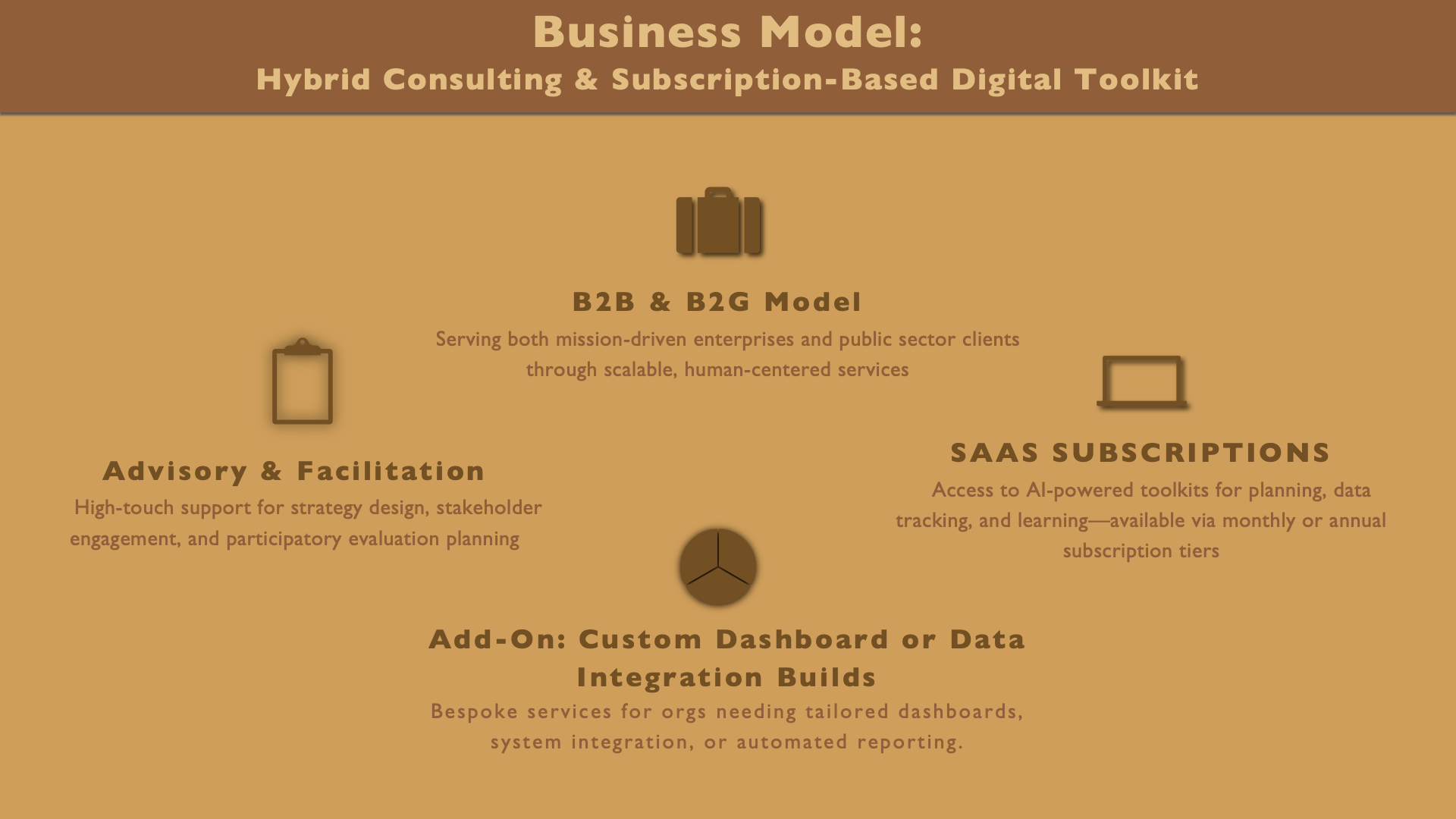
Here’s what ChatGPT had to say:
🔥 "Is this a business model or a clipart convention?"
Lose the icons. They don’t explain or enhance anything. They just take up space and distract from what matters: what you actually do.
🔥 "Your triangle pie chart isn't pulling its weight."
If a shape is the first thing I notice and I still don’t know what it means by the time I finish reading… it needs to go. That triangle? Dead weight.
🔥 "You’re trying to sound premium, but it’s reading like consultant bingo."
“High-touch,” “hybrid toolkit,” “subscription tiers”? You’re not selling enterprise software in 2008. Say what you mean. In plain English. It'll land better and make you sound smarter.
🔥 "Your business model slide shouldn’t need a decoder ring."
If I need to piece together what you offer by hopping around the slide like a word search, it’s time to reorganize. Group your services by what they do — not by buzzword category.
🔥 "You're letting the visuals speak louder than the value."
Big bold icons, centered shapes, decorative lines — and yet I still don’t know why I should work with you. Let the content lead, not the design fluff.
🔥 "The font’s yelling in five different directions."
Pick one typographic tone. Right now it’s giving: bold! …small… ALL CAPS… centered? A consistent font style makes you look deliberate, not disjointed.
Ouch.
Brutal? Yes. Useful? Absolutely.
Did I incorporate its feedback? No.
Huh, you ask?
Why would I do something that would only take ChatGPT 20 seconds to do? Instead, I asked it to incorporate its own feedback. Here it is after the roast (and slight tinkering):
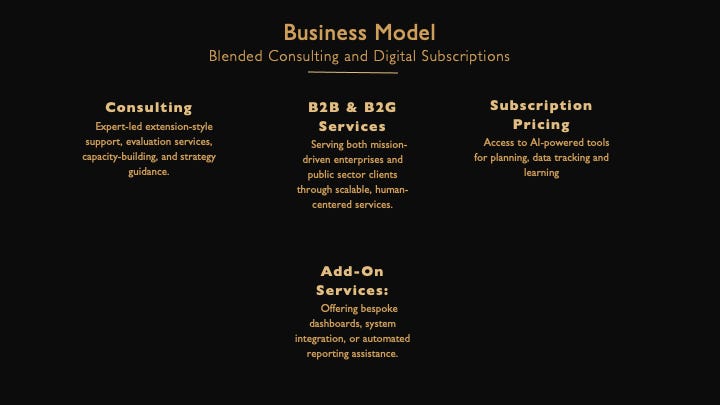
Better.
The roast reshaped not just the layout, but how I talk about what we actually offer.
After that, I roasted every slide. And the result was wild! The feedback got sharper, more creative, and strangely, the process was more fun. I could finally see what wasn’t working. And more importantly, how to fix it.
Why “Roast This Slide” Works
- Tone matters. The word roast flips a switch. The AI stops acting like your intern and starts acting like your editor.
- It gets you out of your own head. It catches vague phrasing, broken logic, inconsistencies, filler content — and that one slide you secretly knew was weak (and you finally have license to drop it).
- You build better, faster. Brutal honesty saves time and strengthens the final product.
Try It Yourself
Here’s how I used it — and how you can too:
1. Talk it out. I explained what I wanted to say, and ChatGPT helped shape the message from scratch.
2. Once a rough slide took form, I’d type: “roast this slide”
3. That flipped the tone — from collaborative to critical. Suddenly it wasn’t helping me build; it was helping me fix.
4. I listened. (Okay, sometimes I argued.) But the feedback was sharp, honest, and usually dead-on.
5. Then I revised — and moved on to the next one.
If you're newer to AI, you can start with a rough draft first. But don’t wait too long — this prompt works best while you’re still shaping the content.
I’ve used it on decks, taglines, strategy docs. Did I use it for this post? Absolutely, and it was even faster because ChatGPT already had the memory of the whole process.(Stay tuned for that blog post.)
Roast This Post.
Yes, really.
You’re reading a post about a prompt called Roast This Slide. It would be deeply off-brand not to say:
Go ahead — roast this post.
Too long? Too meta? Not actionable enough?
Did I try too hard to be clever? Not hard enough?
Did I bury the lede? Over-explain?
You tell me. How did we do?
But, before you rip it apart if you take one thing from this post let it be this:
“Roast this” is the fastest way I’ve found to get clear, honest, and actionable feedback from AI. It’s not just an editing prompt. It’s a creative tool. A thinking partner. A shortcut to better.
Try it.
Then roast it.
Then make it better.